These IT Technical Support Guides deliver clear, practical guidance for everyday technical tasks, built from real-world experience supporting Windows, macOS, Linux, and Microsoft 365 environments.
Each guide focuses on common technical issues, offering step-by-step solutions, troubleshooting techniques, and proven best practices to improve efficiency, strengthen problem-solving skills, and build user confidence. A well-organized knowledge base helps reduce resolution times, improve consistency, and enhance overall help desk performance.
These quick-reference resources are reviewed and updated regularly to ensure the information remains accurate, relevant, and aligned with current technologies and support standards.
Apple MacOS Essentials Guides
- Apple MacBook Essentials
- Apple MacBook Essential (downloadable PDF)
- How to improve DNS for MacOS
- How to troubleshoot MacOS Connectivity to Samba File Server (downloadable PDF)
Windows 11 Troubleshooting
- Common IT Troubleshooting Scenarios
- How to change DNS settings (Windows 11) (PDF Version)
- How to clean an infected PC
- Restoring Windows Network Connectivity with a Winsock Reset
- Windows 11 App Management
- Windows 11 Installation Guide
Microsoft 365 Administration & PowerShell
- Export Office 365 Mailbox (downloadable PDF)
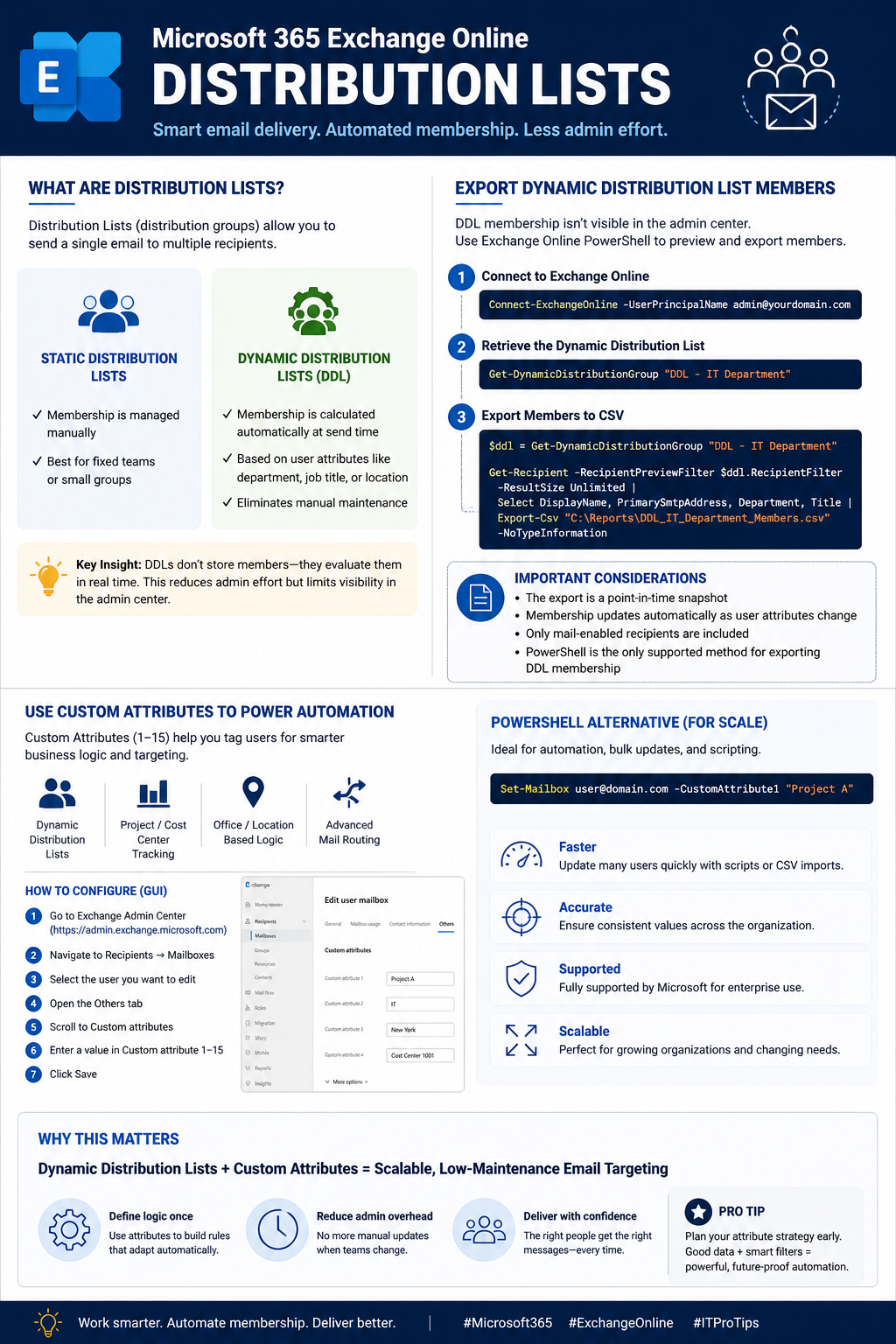
- Microsoft 365 Exchange Distribution Lists (Downloadable PDF)
- Microsoft Distribution List Infographic
- Microsoft 365 Exchange Online
- Microsoft 365 Exchange Online (Downloadable PDF)
- Mastering Microsoft Teams Administration with PowerShell
- Microsoft Teams Quick Reference PDF
- MFA & Conditional Access
- MFA & Conditional Access Infographic Cheatsheet
Ubuntu Essentials Beginner’s Guide & Virtualization
This Ubuntu Essentials Beginner’s Guide offers a hands-on introduction to the Linux desktop with Ubuntu 26.04 LTS. Designed for newcomers, it emphasizes practical daily use, core Linux fundamentals, and building the confidence needed to transition smoothly into the Linux ecosystem.
Learning MacOS and Windows Command Lines Cheatsheets
Exploring the command line provides a deeper appreciation for the capabilities behind each operating system. These command cheatsheet resource offers advanced functionalities and can be particularly handy as a quick reference to enhance one’s command line proficiency.
Usage & Disclaimer
All content is provided for educational and reference purposes only. Scripts, commands, and procedures are used at your own risk. While every effort has been made to ensure the accuracy of this guide, performing administrative tasks incorrectly can lead to issues such as data loss, compliance impacts, or service disruption. Always back up critical data and adhere to organizational policies, security standards, and official vendor documentation. When in doubt, consult a qualified IT professional.